
 Classic pieces
DGT E-boards - worth the money?
Sort:

CM
Sjtsjogoljev

Mar 12, 2019
0
#161
 Classic pieces (white) against Venus pieces (black).
  Venus pieces closeup
 Classic pieces close-up
Mar 12, 2019
0
#165
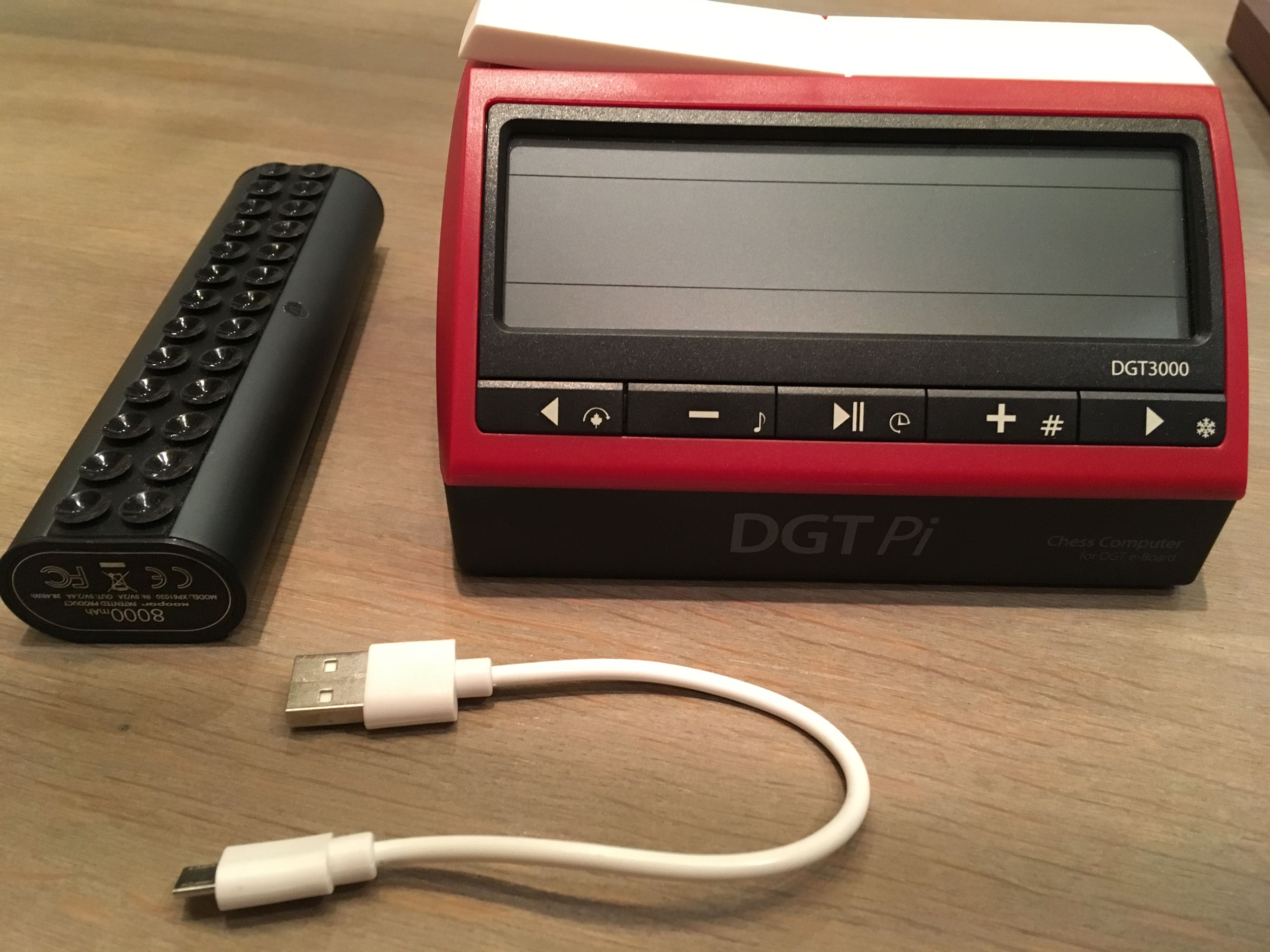 DGT Pi, powerbank and USB connection cable. This is the only cable you need for working with the DGT Pi. Connection between the e-board and the DGT Pi is via Bluetooth.
Mar 12, 2019
0
#166
 Optionally you can connect a DGT3000 clock with a small cable, but DGTPi works wireless. This e-board supports both USB wired and Bluetooth wireless connections.
Mar 12, 2019
0
#167
As you can hopefully see on the pictures, everything is of high quality. The pieces and the board are a work of art in my opinion. The question "is it worth the money?" could also be replaced by "what is the value of art?"
As for the DGT Pi, I use this mostly for training. With the Stockfish engine, it is much stronger that I am. So I put a winning position on the board and then try to actually win this against the machine. For instance KBN - K. If I fail to win the winning position, I reverse the colors and let the machine show me how to win it. I think this is quite useful.


Mar 13, 2019
0
#169
@Nordlandia, I never updated my DGT Pi, but it is possible if you have some technical skills. The DGT Pi has a small SD memory card that contains the engine software. You can remove this card from the DGT Pi, and insert it in your PC. Then you can copy the new software on the card, and put it back in the DGT Pi again.
My DGT Pi is from 2016 and has Stockfish 7 pre-installed, a long with 5 other interesting engines. Each engine has its own characteristics and levels. This is called "DGT Pi image v0.75b"
Early 2018 DGT released "DGT Pi image v0.9l" on their website, but I did not install this yet. I think this version includes Stockfish 8.
If you have the right technical skills, I assume you should also be able to update the engines yourself, but I never investigated that.
More information can be found here:
and here:
the Picochess development website

jv2080 wrote:
I don't have any issues with my board. Then again i am techie. Love this board. One of the BEST chess equipment investments I've made. I've played and practice drills more since getting this board and DGT Pi. It works with the Fritz Software too. The issues people are having may not have to do with the board, but with their computer system. I have the Smart Board with USB connection. oh,by the way, that's my setup in the picture.
Hi jv2080,
i have to be completely honest, since the the new smart boards came out from DGT they have VASTLY improved the connections going for a type c cable instead instead of mini cables which makes the physical plugging in of the cable feel a lot more stable and stronger. i now currenty own 2 bluetooth boards and also 3 smart boards, why you might ask ? well at our chess club we have started using my boards to to live league match broadcasts via the new DGT live chess software to our facebook page. after a few hiccups when we first started the experiment, we now have virtually no issues with the boards at all, meaning all games are being fully covered and enjoyed by the people who visit our facebook page. 

@majorspuds, Can you point me to an online resource (or provide brief instructions) on how to live stream games using DGT Live to a Facebook page? Thanks in advance.

Dec 23, 2019
0
#172
You will need to use DGT’s LiveChess software. I’m not aware of any tutorials on using this software. The DGT manual is pretty good, but like any software, you have to roll up your sleeves and learn by using it. The software allows you to publish games to any website that you have publishing rights to, but you really need to have a firm understanding of FTP to do so. The current version of LiveChess now has a simpler way to get your games up on the internet using the DGT Cloud service. This new feature is explained in detail in the DGT LiveChess Manual.

where do we have to connect the hdmi cable to?


May 31, 2020
0
#174
Has anyone tried to use dgt board as input device for analysis using e.x. Fritz? I mean creating png variations by making moves, then take back some of them, and then making new moves to create more than one variation?
Oct 27, 2020
0
#175
Do any of you have an opinion what DGT board is better or basically the same (except for wireless) - usb-c or bluetooth and why? Thanks in advance for your thoughts.

I’ve read feedback from several Owners of the Bluetooth version that the connection gets interrupted Occasionally. The USB connection is more reliable. The serial connection is still the most reliable way to connect to a computer and the only way that the e-boards are connected when used in official tournament matches.
Somebody else will have to answer why the Bluetooth Connection is unreliable.
Oct 27, 2020
0
#177
chessroboto wrote:
I’ve read feedback from several Owners of the Bluetooth version that the connection gets interrupted Occasionally. The USB connection is more reliable. The serial connection is still the most reliable way to connect to a computer and the only way that the e-boards are connected when used in official tournament matches.
Somebody else will have to answer why the Bluetooth Connection is unreliable.
Many thanks for your comments.

Bluetooth version has a built-in battery and can also work like a USB board (it's got a USB connection). It is worth the extra money.
If my Bluetooth mouse would get occasionally disconnected between the laptop's native hardware and operating system, what more for a chess electronic board? Do get the Bluetooth/USB combo if you can afford it so you have the USB connection to rely on.
I don't experience connection issues with my Bluetooth DGT e-board. The placement of the e-board doesn't normally change relative to the computer (BT receiver) so once the connection works, it stays working.
The bigger advantage of the Bluetooth e-board is that is comes with a built-in rechargeable battery. This allows you to take the e-board with you outside your house and play games on it. The e-board will save those games for you so you don't have to notate. Pretty useful playing casual games at the coffee house.