

http://www.chess.com/blog/NimzoRoy/diagnosing-and-fixing-internet-problems?_domain=old_blog_host&_parent=old_frontend_blog_view
Can't blog a diagram from PGN
Sort:

Apr 4, 2013
0
#2

Jul 4, 2013
0
#3
Ok, I'm going to assume for explanation purposes that you know nothing about this process. Here's how it goes:
select "game or sequence of moves:

Paste the .pgn as below:

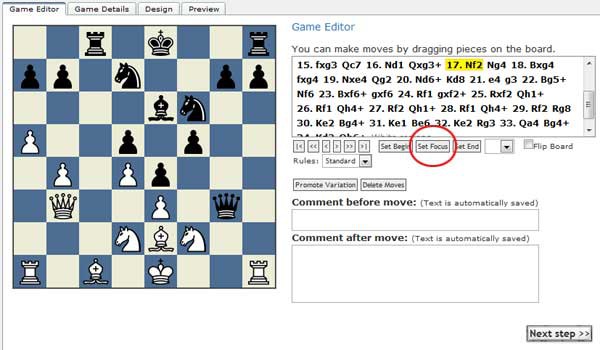
Go to the position you want display and click on "set focus" as below:
Enter or edit the game details here:

Pick board pieces, color, etc. here:

Then click "Preview." The board will be displayed as it will look when inserted into the blog or comments:

I have tried this a few times.
1) I grab a PGN from a game
2) Start a blog, click post diagram, paste the PGN, move to where I want it to be.
3) Leave the appearence defaults as they are
4) Click preview and get stuck in the following window with nothing but a cancel button on the bottom.
What am I doing wrong?