Lucas Chess Beginner help

Sort:
Avatar of splinter1947

I'm a rank beginner in chess.  I've been exploring Lucas Chess as an additional training tool.  I really like Lucas, but most of it is still way over my head.  The opening screen allows you to paste a .pgn and then apparently shows possible moves for each piece as you click on them.  I just have not been able to figure out what all the +s, Xs, colors, etc. mean and how they might help me. Can someone please clear this up for me.  Thanks in advance!

Avatar of notmtwain
splinter1947 wrote:

I'm a rank beginner in chess.  I've been exploring Lucas Chess as an additional training tool.  I really like Lucas, but most of it is still way over my head.  The opening screen allows you to paste a .pgn and then apparently shows possible moves for each piece as you click on them.  I just have not been able to figure out what all the +s, Xs, colors, etc. mean and how they might help me. Can someone please clear this up for me.  Thanks in advance!

Imagine that! A whole website devoted to Lucas Chess. One that explains how to use it and everything.

Who knew?

Avatar of splinter1947

Thank you for the response.  If your remark was intended to make me feel foolish, you succeeded.  I did look all through the Lucas Chess web site and did not find anything that explained what I referenced above. Perhaps I missed something - I'll look again.  Apparently this forum is no place for beginning chess players who ask stupid questions.

Avatar of EscherehcsE

I don't think it was a stupid question. The first time I looked at Lucaschess, I was turned off by the lack of documentation. The program really needs a self-contained Help file as part of the program. Later, they did add a FAQ and a few videos (I think created by other users) that profess to explain the program's features. However, that information isn't really as convenient as a Help file would be.

Another thing I don't like about the program is the limited number of hints that are available. I understand the idea of making the user work for results, but I don't agree with the concept. You shouldn't have to fight the GUI's features; You should be able to use the features to your advantage.

Avatar of notmtwain

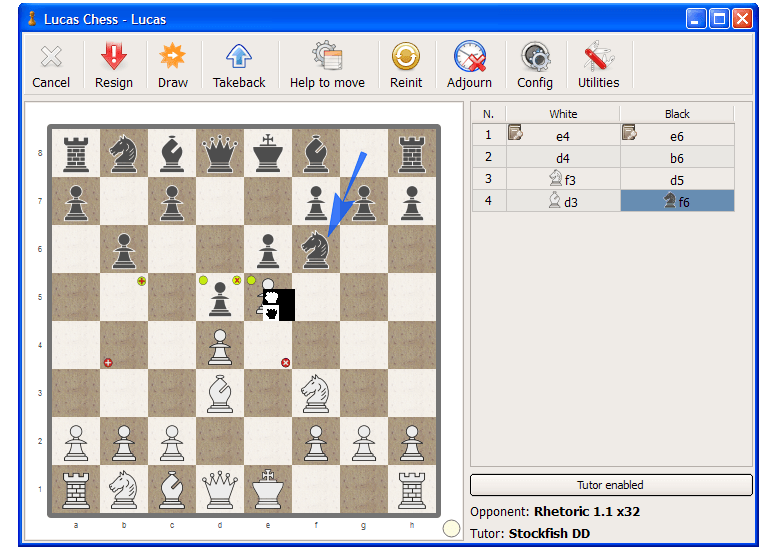
You must mean this. It seems pretty obvious.

It is the tutor showing suggestions for moves. White's main moves for consideration shown in green- pushing to e5, capturing on d5 or checking on b5. Black's main moves are shown in red- a check on b4 or moving the knight to e4.

Avatar of splinter1947

That's very helpful.  Thank you!

Avatar of lkmk

Sorry for the lack of documentation, the main reason is that it is not fun/easy for me to write. I just like to program. This application is not a business in any way, I just hope people understand. And this is for chess players, people tanned in much greater difficulties each daySmile.

Avatar of rstreever

LucasChess would be very helpful to me if I could figure out the Director portion. Specifically, the text option. Does anyone have any suggestions?

Avatar of spritesupremacy
notmtwain wrote:
 

Imagine that! A whole website devoted to Lucas Chess. One that explains how to use it and everything.

Who knew?

RIP

Avatar of EscherehcsE
spritesupremacy wrote:
notmtwain wrote:
 

Imagine that! A whole website devoted to Lucas Chess. One that explains how to use it and everything.

Who knew?

RIP

It just moved. It's here now:

https://lucaschess.pythonanywhere.com/