
Yes. It's a largely meaningless and inaccurate gimmick to engage the users of the site and encourage them to believe that they can improve their play by paying for a superfluous analysis of their games.
Game Analysis Question
Sort:


Nov 5, 2022
0
#3
The analysis is run for a certain amount of time. It is not run to a depth. The speed of the computer determines how deep it looks. A cell phone won't be as fast as a desktop PC so it will not analyze as deep. You're just going to get different numbers depending upon what computer you run it on. It can even change depending upon what else the computer is doing at the time. Don't get wrapped up in the number.


I don't play on my phone, but I've had that same thing happen on the computer. The accuracy rating can change by a couple percent over some period of time after the game.

I recently learned how to use engines more effectively. I would go into your settings and adjust stockfish to analyze at a greater depth. If you set the depth to unlimited (depth 99) then it will continue solving the longer you leave it. If you keep your settings at a lower depth, the computer will sometimes even miss good moves and have an improper evaluation.
InternationalFunkmaster wrote:
I recently learned how to use engines more effectively. I would go into your settings and adjust stockfish to analyze at a greater depth.
I couldn't find that setting.....


Nov 5, 2022
0
#8
Mike_Kalish wrote:
I couldn't find that setting.....
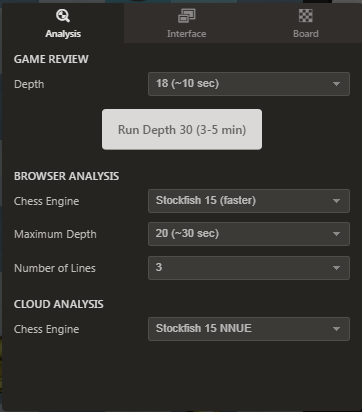
When you're reviewing a game in Analysis mode you see the Stockfish setting:

Click the "gear" setting icon to open a popup window to change the depth.
Thanks! I'm limited as a Platinum member, but good to know how that works.

I just finished a game on my phone and ran a quick analysis. It said I had something like 88% accuracy. My wife came home and I closed it to chat with her. I then pulled the game up on my computer and ran the analysis again and it came back with 90% accuracy.
This isn't the first time this has happened. Any clue as to why the analysis on my phone app comes up differently than on the website?
Thanks!