

fastest way to do it:
#1 Right click on that image then click on copy, then go to the forum and press Ctrl+V
OR
go to the site from where you wanna copy the gif, then do this
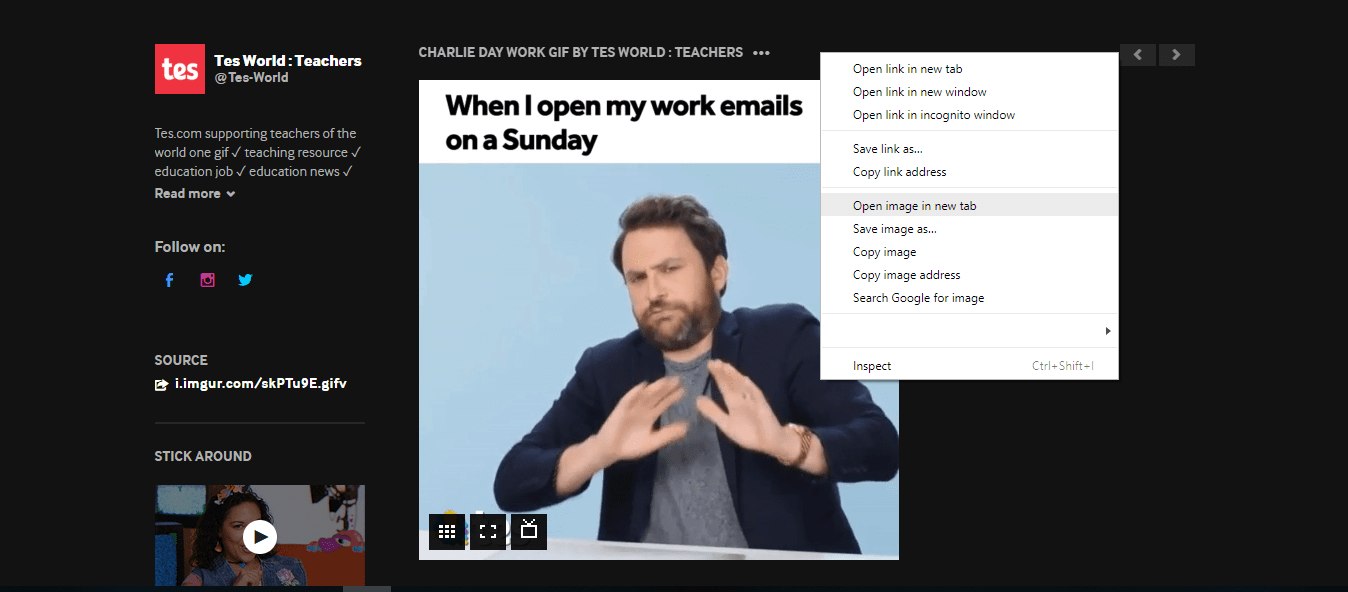 right click on the image, then select "open image in new tab"
then copy that URL that you see on the new tab.
then go to the forum you wanna post the gif, then you can either:
2)click on that chess.com's insert image as usual, then paste the URL in that External Link box.
3) try pasting the URL directly in the comment box, now, you wont see the URL, but the image!
Or... the usual way... download the image, then upload.


 ok so ya didn't work this time; let's see; i just pull up image on goodle, but if there are a bunch of images click on the one you want so it's only that one on the main page, when it's runnin, I just rightclicked and CUT then went here and PASTE


How do you insert GIF? Not the chess making GIF. Like the ones from the internet. I tried everything but it seems it does not work!
Please help me!