
Easy for black.
Where did White go wrong?
Sort:


Optimissed wrote:
Just a point of interest xplayer but you've probably noticed that he played Be2 without defending his e-pawn. Normally, the point of a move like Nf6 is that it's considered to be forcing. That is, white has to defend the e-pawn. Can't you just take it?
no you cannot take the e pawn.
after 1. e4 c5 2. Nf3 d6 3. Bb5ch Nc6 4. Bxc6ch bxc6 White does not have to worry about his white squared Bishop anymore.

Optimissed wrote:
Just a point of interest xplayer but you've probably noticed that he played Be2 without defending his e-pawn. Normally, the point of a move like Nf6 is that it's considered to be forcing. That is, white has to defend the e-pawn. Can't you just take it?
Yeah the Move orders I gave are usually the Mainline move orders of the Alapin and the line I play as black. Yeah actually believe it or not the E pawn is defended lol by a Trap. So its blacks best interest not to take that pawn otherwise he loses on the spot. Give it a shot lol see if you can find it after Nxe4.
Here is the mainline move orders so give you some help. Ill give you a hint as well.
I will give you a hint lol. After black plays 6...0-0. The reason white plays 7.Bf1 is to defend the E pawn becuase than the threat of taking the E4 pawn is real.
Can you see the Trap? It might be tough to spot at first but I have fallen for it at least a dozen times lol.

Clearly Nxe4 is a mistake. That's why as black I like to play 4...Nbd7 so that I really am threatening to take e4. A lot of the time the game will continue along the lines of 5.d3 b6 6.0-0 Bb7 7.Nbd2 g6 etc. Here's an example:

Sorry, missed that!
That makes Bd3 worse than ever. White shouldn't be burying his bishop.
Not only does White bury his bishop, it costs a tempo to do it.
In the Ruy Lopez, the bishop can typically end up on c2 after 3 or 4 moves. Here the idea is to get it there after 2 moves. Why does this basic stuff need explaining ?

I think white missed a tactic there.
Strangely, the Ruy Lopez is a different opening, Fgtv.
Yes, 5 Q h5+ looks a mite troublesome!
The Ruy Lopez was a "for example", anticipating the cross-referencing capabilities of the reader :)
I don't think it serves as a good example, though. In the Ruy, White allows Black's expansion on the Q-side to chase the bishop to c2, from where it supports the centre and a k-side attack, whilst Black has possibly over-extended himself on the q-side by so doing. Here in this opening, white deliberately wastes moves by playing his B there. They are not really mutually commensurate. 
Just played a wonderfully tactical 10 minute game. Wish I knew how to post games. They should give instructions.
We will maybe end up calling you Optimissedthepointcompletely :)
Brilliant win against agankojic though!
Could be there wasn't a point!
Thankyou very much. I wouldn't say it was brilliant so much as by some stroke of good fortune I managed to hold it together. He made an obvious blunder in K f7 instead of blocking with his N though. After that it was just a case of managing to play the right obvious moves, in the right order.
Optimissed wrote:
Just played a wonderfully tactical 10 minute game. Wish I knew how to post games. They should give instructions.
It is actually pretty easy once you get the hang of it. I had some trouble in the begin now it comes like clock work to me lol.
Bascailly you can do the same process with any game you play once you get it hang of it.
So here is an example:
http://www.chess.com/livechess/game?id=1114608711
The above link is 1 of your games.
Step 1:
You want to get a game and open it.
For this example I will use the above link which was your game vs MustafizR. If you click on the below link it should pop up like the Picture below
http://www.chess.com/livechess/game?id=1114608711
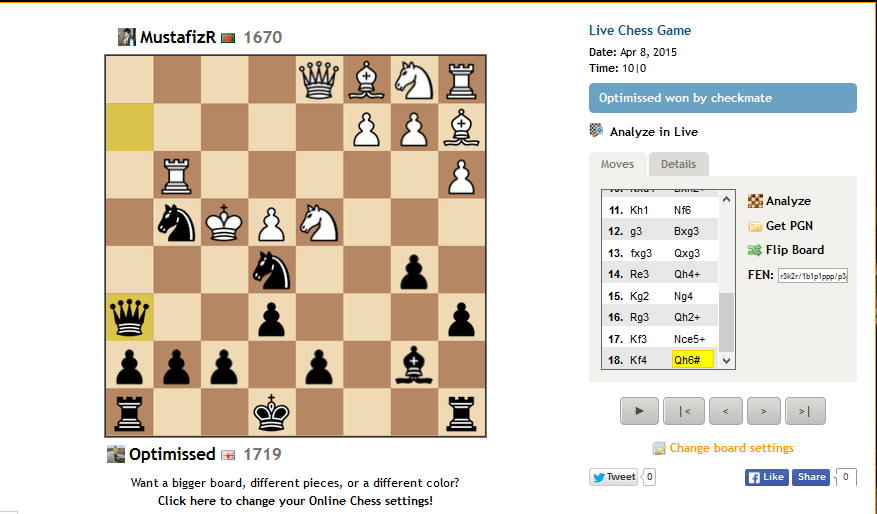
When you open your game you want to have it look like the above picture.
Step 2:
You want to get the PGN of that game
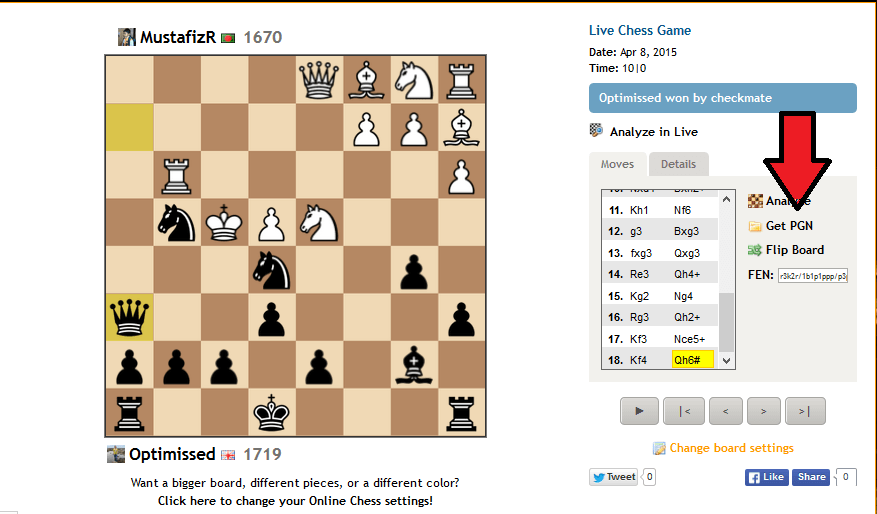
Notice the red arrow I have. You want to click that spot where it says "Get PGN"
Notice you click it. A pop up box will appear.

It will look like the above box.

Very important you want to make sure it is selected to Open with Notepad. Notice the Red arrow here it says NotePad.
If it does not say Notepad you need to go to were the Green arrow is in this picture and select that box until you find Notepad.
Step 3:
Once you have it selected to NotePad you will push OK. A new Pop up box will appear. which looks like the below picture.

It will be the PGN of your game which is what you need. Once you have this you want to keep it around for a little bit. We will come back to this picture in Step 6.
Step 4:
In this step you are going to want to make a diagram so that you can post it to the forum's. The diagram will be on any chess forum so for example on this chess forum. You will see the following picture.

So this is just like any other chess thread forum only thing is it will have your avatar not mine lol. But yeah once you get this you will want to click on the diagram box so below picture will show.

Ok if you notice the red arrow it is pointing to the diagram box you will need to click on that box. Once you click on it a new pop up box will appear.

In this situation we are trying to look at a game or sequence of moves so you want to make sure to click/bubble in the Game or Sequence of move bubble.
This is not a diagram or puzzle so notice the red arrow how it is bubbled in. After you do that push continue.
Step 5:
After you push continue new screen will appear it should look like the following picture below.

So here comes the tricky part. We are going to want to insert the PGN we got a while ago into this above picture.
Step 6:
Select the Use a PGN file.

Once you have it bubbled in or selected you than want to go back to the previous notepad page we were saving before. Should look like below picture.

Bascially we want to insert that text into the PGN file Box.
The way to do that is to highlight all of the text. The way to highlight the text is by holding down your left click mouse button just hold it down than dragg your mouse over all of the text. It should than look like the below picture.

As you can tell its all blue becuase its highlighted. Once you have it all blue you than want to copy it.
Their are 2 ways of Copying it.
1) You can copy it by right clicking on your mouse than select "Copy"
or
2) You can hold down the key on your keyboard labeled "CTRL" once you have it held down you than want to push the Letter "C" on your key board
So to be simple you can have 1 finger holding down the "CTRL" key and other finger Pushing the Letter "C" at the same time.
Either option works so which one is easy for you is the one you should go with.
Step 7:
You want to insert the text you have just copyed into the Use a PGN File Box. You want it to look like the below picture.

The way you do that is by clicking inside of the box. Than you want to Paste the text inside.
2 ways to Paste it
1) You can Paste it by right clicking on your mouse inside of the box than select "Paste"
or
2) You can hold down the key on your keyboard labeled "CTRL" once you have it held down you than want to push the Letter "V" on your key board
So to be simple you can have 1 finger holding down the "CTRL" key and other finger Pushing the Letter "V" at the same time.
Either option works so which one is easy for you is the one you should go with.
Once you have done that push continue. Your almost done now lol.
Step 8:
At this point you should see your Diagram with a bunch of moves on it. which are your moves and your opponents moves.
Game Editor Tab:
You can add commentary before a move and after a move stuff like that.
You can also Flip the Board to face your side if you want.
The only warning I will give is becareful with how long it takes you to add commentary. I have notice that sometimes when you take to long to add commentary or if you type a really long post sometimes chess.com times out and the post doesn't get posted on forums. After you write what you want to write or Flip board etc.
Than you push Next Step at the bottom and it will go to
Game Detail Tab:
Which it should have your Game Details already correct on there. However, you can always give it a brief look if you want to.
Than you push Next Step again.
Design Tab:
It will than give you Board Color options, Piece style options, and also if you want to Show Cordinates on your board.
At that point usually your done lol. Some people do go to Next Step which is.
Preview Tab:
It shows a preview their game of what it might look like. However, I don't use it. lol At that point I usually just push Insert Button. I will show you an example picture of the options you have their.

So if you look at the 4 black arrows you will see the Tab's I'm talking about which I gave a brief over view of what they are.
Also The Green arrow shows were the Next Step button is.
The Red arrow shows where the Insert button is. Bascially you don't have to go to any tab's if you don't want to. The Insert button is more or less the finish button. It will insert the game into the Forum. Which I will show you a picture.

So that is what it will look like when you go to your box and than Below is how it should appear on the Forum if you manage to do all of the Steps right.
I usually just cross my fingers and hope for the best at this point lol.

That's right, it really doesn't look all that amazing for white. It should be about level.